Does easyJet Have WiFi? Internet, Onboard Portal and Availability Explained

If you are wondering whether easyJet has WiFi, the short answer is: easyJet does not currently offer conventional in-flight internet access.
You cannot use easyJet WiFi to browse websites, check social media, send WhatsApp messages or stream Netflix while flying. There is no free or paid internet package available to purchase.
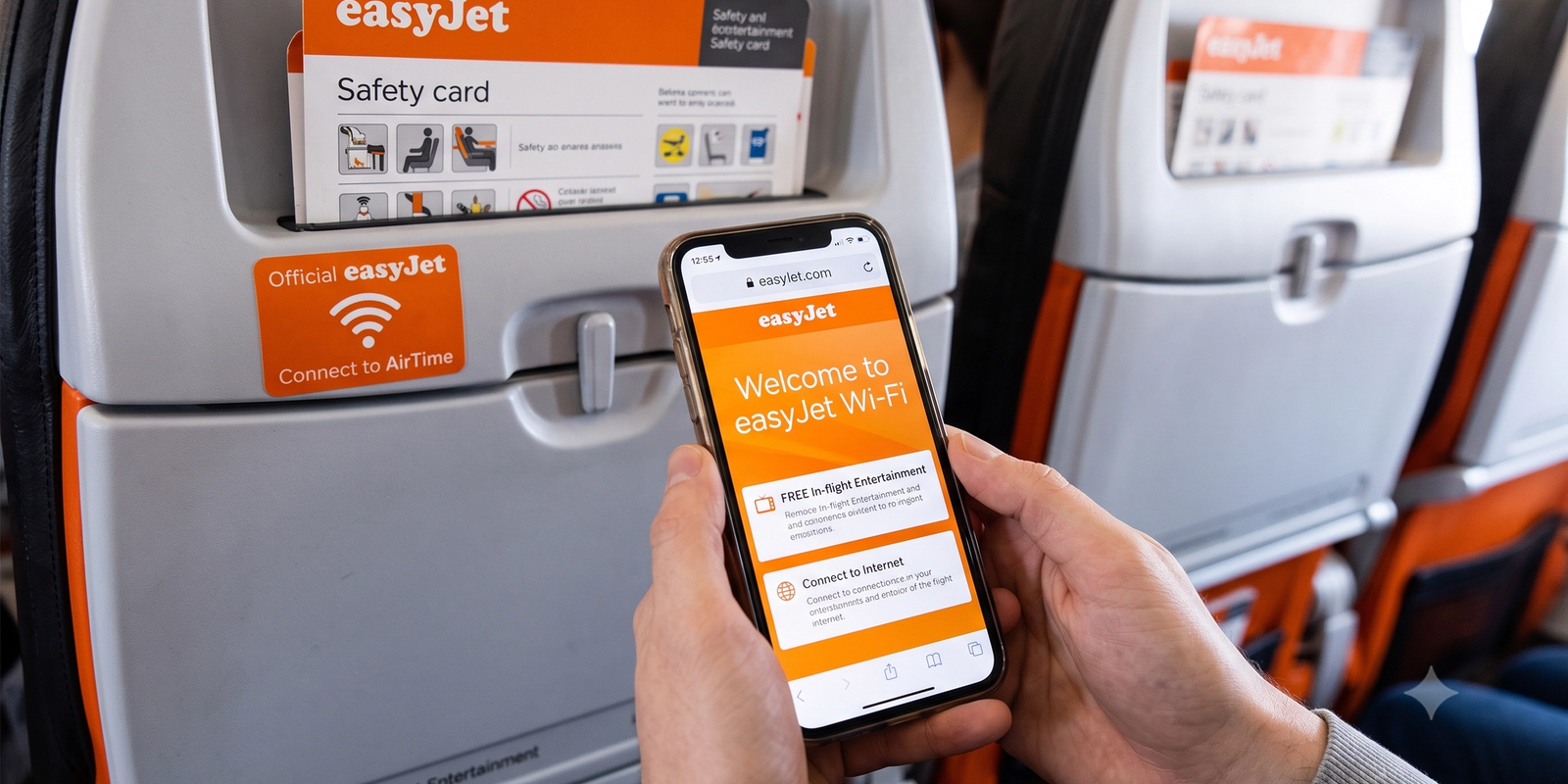
However, easyJet does operate a local onboard WiFi network. This connects your device to an entertainment and information portal stored inside the aircraft rather than connecting it to the internet.
That distinction explains why some passengers see an easyJet onboard WiFi network even though the airline does not provide internet access.
easyJet does not currently have passenger internet WiFi on its flights. This applies across its European route network and its principal Airbus A319, A320 and A321-family aircraft.
There is no easyJet internet package for browsing the web, sending emails, accessing cloud documents or using messaging applications while in the air.
What easyJet does provide is a wireless onboard portal powered by AirFi technology. Your phone, tablet or laptop connects to a local signal inside the aircraft, but that signal is not linked to the wider internet.
It works more like connecting to a private media server than connecting to WiFi at home.
This means both of the following statements can be true:
For an explanation of how this differs from satellite and air-to-ground connectivity, see our complete in-flight WiFi and entertainment guide.
The easyJet onboard portal is a locally hosted digital service that passengers can open through their own devices.
The system uses portable hardware supplied by AirFi to create a wireless network inside the cabin. Information and entertainment are stored onboard, allowing the portal to work without a satellite internet connection.
Depending on the aircraft and current content selection, the portal can provide: Digital games Journey-specific information Destination content Flight information The onboard food and drink menu Shopping and retail products Digital magazines or promotional content Entertainment selected by easyJet Information about onboard services
AirFi announced that its portable streaming platform had been deployed across easyJet’s then-complete 327-aircraft fleet in 2023. The system was designed to work on passengers’ smartphones, tablets and laptops without requiring a separate app or account. You can read more about the technology through AirFi’s official easyJet deployment announcement.
Availability can still be affected by aircraft changes, maintenance or technical problems.
No. The easyJet onboard WiFi portal and an in-flight internet connection are two different things.
A WiFi symbol on your phone only means that your device has joined a wireless network. It does not guarantee that the network has an internet connection.
Connection instructions may be displayed on the seatback, in the seat pocket or announced by the cabin crew.
The usual process is: Put your device into Airplane Mode.
If the portal does not open automatically, temporarily turn off any VPN, private DNS service or Apple Private Relay. These services can prevent local captive portals from loading correctly.
Remember that connecting successfully will not allow ordinary websites or apps to access the internet.
There is normally no public easyJet WiFi password required to access the onboard portal. Passengers connect to the aircraft’s local network and open the portal through a browser or cabin QR code.
If your device asks for a password, check the instructions provided onboard or ask a member of the cabin crew. Do not use passwords posted on unofficial websites, as network names and connection procedures can change.
There is also no separate easyJet internet password that unlocks browsing. The absence of internet is a limitation of the onboard system, not a login restriction.
The easyJet onboard portal is generally free to access. You do not need to buy a WiFi pass simply to view the content stored on the aircraft.
However, easyJet does not offer free internet because it does not presently provide passenger internet access at all. There is no paid package available as an alternative.
You may still need to pay for food, drinks or retail products selected through the portal. Connecting to the portal itself does not make those items complimentary.
No. WhatsApp requires an active internet connection to send and receive new messages.
The same limitation applies to: Facebook Messenger iMessage Snapchat Instagram Signal Telegram Standard email applications Online collaboration tools
Previously downloaded messages may remain visible on your device, but nothing new will be delivered until you reconnect to the internet after landing.
This differs from airlines offering sponsored or complimentary messaging. For comparison, our T-Mobile In-Flight WiFi guide explains how messaging works on participating US airlines.
You cannot stream Netflix, YouTube, Disney+, Prime Video or other online services through easyJet’s onboard network.
You can still watch content that was downloaded to your device before departure. Most major streaming applications support offline downloads, although downloads can expire and individual titles can be removed from a service.
Before leaving for the airport: Download films and television programmes
Do not wait until boarding to download a large film. Airport WiFi can be congested, and mobile reception may be weak at the gate.
No. Connecting to the easyJet plane WiFi does not allow you to use Google, visit websites, access social media or work in cloud-based applications.
If you need to work during the flight, make files available offline before boarding. Applications such as Microsoft Word, Google Docs, Notion and Dropbox may support offline working, but the setting normally needs to be enabled in advance.
Changes will not synchronise with other devices until an internet connection becomes available after landing.
Our guide to preparing your smartphone for international travel includes more ways to prepare your device before leaving home.
easyJet primarily operates international and domestic short-haul services around Europe and nearby destinations. Its internet policy does not change simply because a flight crosses an international border.
You should not expect internet access on: Domestic UK flights Flights within the European Union UK-to-Europe routes Flights to North Africa Flights to Turkey Flights to Mediterranean islands Longer easyJet leisure routes
The local onboard portal can work without an external connection and may therefore be available on international routes. Its availability depends on the aircraft rather than the countries being flown over.
No. Mobile data should remain disabled while flying unless the crew specifically instructs passengers otherwise.
Airplane Mode switches off the phone’s conventional cellular radio. You can then manually reactivate WiFi and Bluetooth for permitted onboard uses.
Your phone may briefly detect a ground-based mobile network at low altitude, but attempting to use it is unreliable and can lead to roaming charges. Wait until the aircraft has landed and the crew permits normal device use.
Power availability varies between aircraft and seat location. Passengers should not assume that their easyJet seat will have a USB socket or conventional power outlet.
Charge all essential devices before leaving for the airport and consider carrying an approved portable power bank. Spare lithium batteries and power banks normally need to remain in hand luggage rather than checked baggage.
Downloading entertainment is only useful if your device has enough battery to last for the flight.
Installing full in-flight internet involves considerably more than placing a router inside the cabin.
Satellite internet systems can require: Exterior aircraft antennas Additional onboard hardware Aircraft modifications Certification and installation downtime Ongoing provider fees Maintenance Additional weight
These costs are especially significant for a low-cost airline operating predominantly short European flights. Passengers may be unwilling to pay for internet during a journey lasting only one or two hours, making it more difficult for the airline to recover the expense.
In January 2026, easyJet chief executive Kenton Jarvis confirmed that the airline had held discussions with Starlink. He described the product positively but said the economics did not yet work for easyJet. The airline was also speaking with other providers and would continue watching the developing market, according to Reuters’ report on easyJet’s Starlink discussions.
easyJet has considered Starlink, but it has not announced a confirmed Starlink agreement or fleet rollout.
The airline’s discussions show that it is not opposed to introducing internet permanently. The current obstacle is whether a provider can offer a service that works financially and operationally within easyJet’s low-cost model.
A future system would need to balance: Installation cost Fuel efficiency Hardware weight Reliability Connection speed Passenger demand Whether access would be free or paid The limited length of many easyJet flights
Jarvis said easyJet would choose a suitable service when the time was right, but did not give a launch date. Any website advertising a confirmed easyJet Starlink rollout or an exact activation schedule should therefore be treated cautiously unless easyJet has issued a new announcement.
easyJet’s local portal is useful for basic entertainment and flight information, but it is more limited than the connectivity available on several other carriers.
Airline Typical WiFi arrangement easyJet Local onboard portal; no open internet Delta Air Lines
Free internet for SkyMiles members on equipped flights American Airlines
Free or paid options depending on aircraft and current rollout JetBlue Complimentary Fly-Fi on supported aircraft British Airways
Free messaging and paid browsing on existing systems, with newer connectivity being introduced Ryanair No conventional passenger internet Wizz Air No conventional passenger internet
Availability changes rapidly and can differ between individual aircraft. See our Delta Inflight WiFi guide and American Airlines inflight WiFi guide for airline-specific comparisons.
Because there is no easyJet internet on board, prepare these items before travelling:
Several of our recommended travel-planning apps can be prepared for offline use before departure.
If the onboard portal should be available but will not load: Check that Airplane Mode is switched on.
The system may be unavailable because of a technical fault or an aircraft substitution. Cabin crew cannot usually restore a failed onboard server during the flight.
The portal is worth opening if you want to check flight information, browse the menu or use the available games and entertainment. It is free and does not normally require an app, password or registration.
It should not be treated as a substitute for internet access. Passengers who need to work, communicate or access online entertainment must prepare before boarding.
The simplest rule is: if an activity normally needs mobile data or home WiFi, assume it will not work during an easyJet flight.

Written by
Grace is a freelance travel writer from Lancashire, England. In 2019, she embarked on a year-long adventure across India where she discovered her passion for crafting engaging travel content. Since then, she’s turned that passion into a full-time career, making her mark in various international travel publications. When she’s not writing and exploring, Grace enjoys foraging for wild plants and fungi and spending time in nature with her border terrier, George.
More from this expert© 2026 ClickTravelTips. Made for travelers worldwide.